How to Create Quick Hypnosis Sessions
Learn how to instantly create short, focused hypnosis sessions for immediate relief and daily practice.
Prerequisites
- •Any subscription tier (Free, Basic, Premium, or Ultimate)
- •Signed in to your Hypnothera account
Step-by-Step Guide
Navigate to Quick Hypnosis
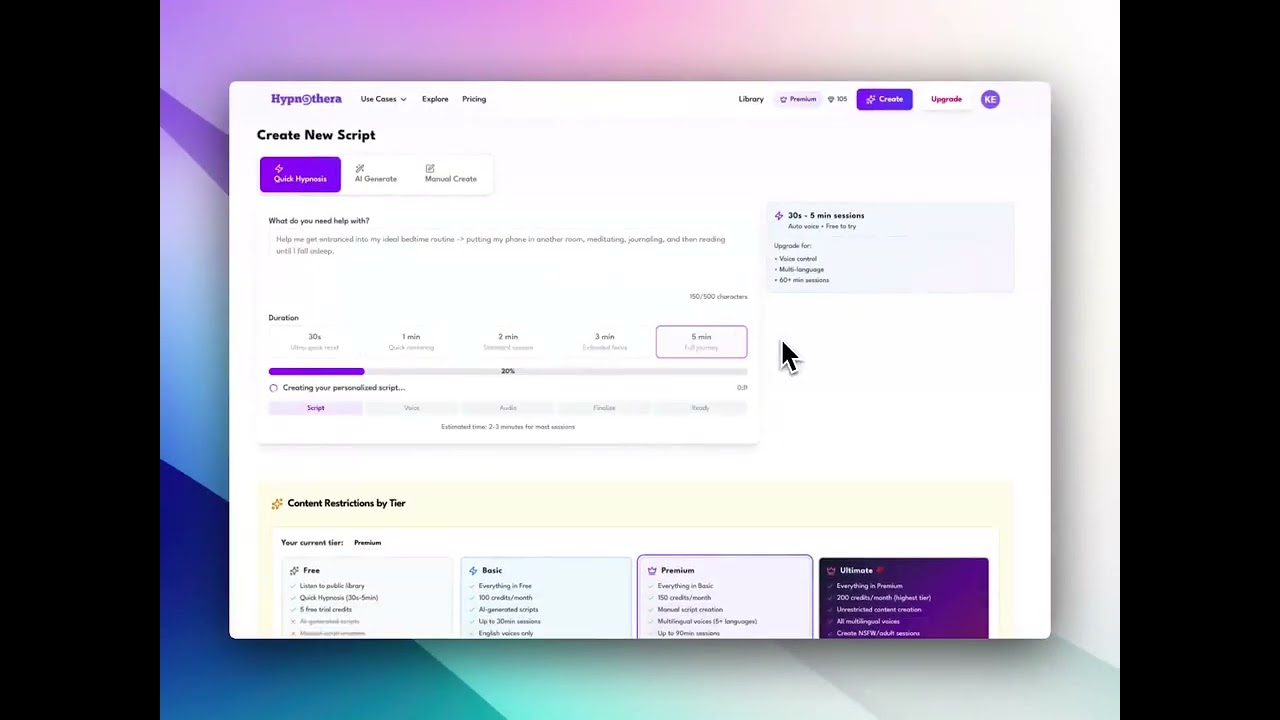
Click on 'Create' in the navigation menu, then select the 'Quick Hypnosis' tab. Or go directly to the Quick Hypnosis page from the main menu. This feature is designed for rapid session creation.
Describe Your Immediate Need
In the text field, briefly describe what you need help with right now. Be specific but concise. For example: 'Reduce anxiety before a presentation', 'Quick relaxation during lunch break', or 'Energy boost for afternoon'.
Set Session Duration
Choose your session length using the duration slider. Options typically range from 3 to 15 minutes. Shorter sessions (3-5 min) are great for quick breaks, while longer ones (10-15 min) provide deeper relaxation.
Select Voice
Choose your preferred voice from the dropdown. Quick Hypnosis uses the same high-quality AI voices as full sessions. Pick a voice that you find calming and pleasant.
Generate Your Quick Session
Click 'Create Quick Hypnosis' or 'Generate' button. The AI will simultaneously create a focused script AND generate audio. This combined process is faster than standard script generation.
Wait for Processing
Quick Hypnosis sessions typically generate in 2-4 minutes. You'll see a progress indicator showing both script creation and audio generation phases. The session is optimized for your chosen duration.
Listen Immediately
Once complete, you'll be redirected to the playback page automatically. Your session is ready to listen immediately - no additional steps needed.
Access Anytime
Your Quick Hypnosis sessions are saved to your library along with your full sessions. You can revisit them anytime from the Quick Hypnosis page or your main library.
Tips & Best Practices
- Quick Hypnosis is perfect for daily practice - create a new session each day based on your current needs
- 5-minute sessions work great for office breaks or between tasks
- Bookmark your favorite Quick sessions for repeated use
- Use very specific descriptions for better results: 'calm nerves before job interview' rather than just 'stress'
- Quick sessions are excellent for building a daily hypnosis habit without time commitment
- Create multiple 3-minute sessions for different times of day: morning energy, midday reset, evening wind-down
Troubleshooting
Problem: Quick Hypnosis generation fails
Solution: Check your internet connection. Ensure your description is clear and appropriate. Verify you have sufficient credits (Quick sessions use fewer credits than full sessions). Try simplifying your description.
Problem: Session is too short or doesn't cover my need
Solution: Try increasing the duration slider. Make your description more specific so the AI can focus on exactly what you need. For more comprehensive sessions, consider using the standard script generation instead.
Problem: Can't find my Quick Hypnosis sessions
Solution: Quick sessions are saved in your main library but tagged as 'Quick Hypnosis'. Use the filter options in your library to show only Quick sessions. You can also access them from the Quick Hypnosis browse page.
Problem: Quick session generation takes longer than expected
Solution: Quick sessions should generate in 2-4 minutes. If it takes longer, check your internet connection. The system may be under high load - try again during off-peak hours. Sessions with longer durations take slightly more time.
Related Tutorials
How to Create Your Hypnosis Session
Learn how to create a personalized hypnosis script with the guided creator. A few quick choices and a short brief turn into a full, editable session.
How to Generate Audio from Your Script
Learn how to transform your written hypnosis script into high-quality audio with natural-sounding AI voices.
How to Listen to Your Generated Audio
Master the audio player features and learn how to listen to, manage, and download your generated hypnosis sessions.